•
Boostiko Team

Crypto Prop Firm Security Emails: Build a Verification Flow Customers Trust
Crypto prop firm emails have a trust problem before a customer even reads the first sentence.
Customers see a message about a login, a wallet connection, an account review, a rule update, or a support request. The message may be real. It may also look exactly like the type of urgent email a phishing scam would send.
That is why a crypto prop firm needs a deliberate security email system. The goal is not to make emails sound more alarming. The goal is to make authentic messages easy to recognize, easy to verify, and easy to act on without teaching customers to click under pressure.
CISA says phishing messages often appear to come from a trusted organization and use urgent language, requests for personal or financial information, shortened URLs, or misleading email addresses and links. If a person thinks a message might be real, CISA advises finding a verified way to contact the organization rather than using the information inside the suspicious message. 1
That guidance gives email teams a practical standard. Your security messages should teach the safe behavior you want customers to follow. They should not train customers to ignore their own caution.
This article is general operations guidance, not legal, financial, trading, or cybersecurity advice. Each firm needs its own review of product terms, customer data, applicable laws, markets, security controls, and approval process.
Build a system customers can recognize
A secure email flow starts before copy is written. The customer needs a repeatable way to know what a real message from your firm looks like.
Use a stable From name and sending domain. Keep account alerts, marketing campaigns, and support follow-ups organized so customers do not receive conflicting messages from unrelated addresses. Put the verified dashboard URL in your onboarding guide, website header, help centre, and support signature. Then tell customers that they can always start at that known route instead of relying on a link in an unexpected email.
This does not mean every email must be plain or cold. It means the core signals should stay consistent: who the message is from, why it was sent, what account event triggered it, where the customer can verify it, and how to reach support.
A short security note in the welcome flow can do a lot of work:
How to verify account messages
We will never ask for your password, recovery phrase, or private key by email. If you receive a message about your account and want to check it, sign in through the dashboard link you already use or visit our website directly. Support can help you confirm a message through our official help route.
Only make a statement like this if it is true for the firm’s actual support process. The operations team must be able to keep the promise.
Give every account email one clear purpose
A long, mixed email makes a customer work too hard. It also creates room for phishing-like patterns such as an urgent headline, a large action button, and a promotional block that distracts from the actual account information.
Each security or account message should do one job.
New login alert
Trigger: The account system records a qualifying login event under the firm’s approved security rules.
Purpose: Tell the customer that an account event occurred and direct them to a verified way to review it.
What to include: The event type, the time in the account’s relevant time zone, a broad location or device detail only if the system can reliably provide it, and an instruction to open the normal dashboard directly if the event was not expected.
What to avoid: A link labelled “Secure your account now” that starts a sensitive account recovery flow without a verified sign-in step.
Password or account recovery notice
Trigger: A verified account recovery or password change action starts or completes.
Purpose: Make the customer aware of the change and give a safe route to get help if it was not requested.
What to include: The type of request, when it happened, and a clear path to contact official support or open the dashboard through the known website route.
What to avoid: Asking the person to reply with identification documents, wallet secrets, or authentication codes.
Wallet or payout detail update notice
Trigger: A user makes a verified change to a sensitive account setting.
Purpose: Confirm the event, show the current status, and make it easy to flag an unexpected change.
What to include: The type of setting changed, the timestamp, and a support route. If the firm shows a partially masked identifier, use only a value that the account system can safely display.
What to avoid: Repeating the full sensitive value in the email body.
Support ticket confirmation
Trigger: A customer starts a support request through an official route.
Purpose: Confirm that the team received the request and set expectations for the next authentic contact.
What to include: A ticket reference, the support topic, and a reminder that staff will not ask for secret credentials.
What to avoid: A generic link that sends every customer to an unauthenticated form without context.
Product or rule update
Trigger: An approved product owner confirms that an account rule, product condition, or policy source has changed.
Purpose: Direct the customer to the current source of truth.
What to include: What changed, who it affects, the effective date, and a direct route to the official rule page or authenticated account area.
What to avoid: Rewriting a detailed rule in the email if that text may change again. Email should point customers to the maintained source.
The value of this structure is simple. It allows the firm to control the exact circumstances in which each message sends. It also gives support a clear answer when someone asks whether the email was legitimate.
Do not use urgency as the security message
An urgent message can be necessary when a real account risk exists. But urgency needs to come from a real, specific event. It should never be a generic copy tactic.
CISA lists emotionally appealing or urgent language as a common phishing warning sign. It also advises people not to use links or phone numbers in a suspicious message and to find the organization through another verified route instead. 1
That means a real crypto prop firm email should not punish a customer for taking a moment to verify it. Avoid copy such as “Act now or lose your account” unless a confirmed policy truly creates that consequence and the exact deadline is accurate for that recipient. Even then, provide a safe verification route outside the button in the email.
A better account-security pattern is direct:
Subject: Review a recent account setting change
A change to your account settings was recorded on [date and time]. If you made this change, no action is needed. If you did not make it, open your dashboard through the website you normally use or contact support through the official help route.
That message gives the customer information without asking them to trust the email blindly.
Make the dashboard the source of truth
A crypto prop firm’s email should not become the place where sensitive account decisions are completed.
The dashboard should be where the customer verifies an account event, sees the current account state, finds product rules, and starts a protected action. Email should be the notification layer. It tells the customer that something happened and points them back to the secure place they already know.
This separation helps in three ways.
First, it makes phishing harder to imitate. A scammer can recreate an email, but the customer has been taught not to begin a sensitive action from an unexpected email.
Second, it makes product changes easier to manage. When a rule or account condition changes, the firm updates the maintained dashboard or policy page. The email can link to that source rather than preserving outdated text in an inbox.
Third, it gives support a reliable workflow. A support agent can tell someone to go to the normal dashboard or official help centre without sending a fresh sensitive link during a stressful conversation.
Treat authentication as part of customer experience
Email authentication is not only an infrastructure item. It is part of what helps customers recognize a genuine sender.
Google requires senders to Gmail personal accounts to use SPF or DKIM. For senders who send more than 5,000 messages per day to personal Gmail accounts, Google requires SPF, DKIM, and DMARC. Google says authenticated mail helps protect recipients from spoofing and phishing, and recommends all three methods. 2
The email team should work with the technical owner to confirm the actual setup. That includes the public sending domain, the email service provider, DNS records, From domain alignment, and reporting ownership. Do not assume an email platform has solved this just because it can send messages.
For account messages, a recognizable authenticated domain helps reinforce the safe verification pattern. For marketing mail, it supports delivery and helps protect the brand from impersonation. Neither replaces a secure product experience, but both belong in the operating system.
Keep security messages separate from offers
Security notices should answer the customer’s account question. A sales offer should be a separate campaign with its own audience, permission, terms, and opt-out treatment.
The FTC explains that CAN-SPAM looks at an email’s primary purpose. A message that consists only of account, safety, security, or relationship information can be transactional or relationship content. A mixed message may be commercial depending on the subject line, the placement of promotional material, and the overall message. 3
The practical rule is to keep account notices clean. Do not add a large discount, upgrade offer, or referral prompt at the top of a password alert. Do not hide a risk education reminder inside a campaign email. Customers need to understand why the email exists before they decide what to do.
Separate messages are better for measurement too. The security team can measure whether people found the dashboard or contacted support. The marketing team can measure whether an eligible, opted-in audience engaged with a promotion. Neither team needs to guess what a click meant.
Apply permission controls before marketing sends
A person who has an account may need operational notices. That does not automatically make them eligible for every marketing campaign.
The ICO says marketing emails to individuals generally require specific consent, subject to a limited soft opt-in exception. It also says organizations must not conceal their identity, must provide a valid contact address, and should maintain a do-not-contact list that is screened before sending. 4
Build this into the audience logic. Store the permission source, capture date, market, message type, and later preference changes. Before a campaign goes out, screen the list against unsubscribes, complaints, hard bounces, account restrictions, and frequency caps. Keep service and security notifications in their own carefully defined flows.
The goal is not to find a technical workaround. The goal is to contact people in a way that matches the relationship and the permissions they gave the firm.
Review crypto promotions by market and product
A security email can become a promotion if it contains a large sales message or invites someone to make an investment or purchase. That is why the content review needs to consider more than the email’s trigger name.
For qualifying cryptoasset promotions to UK consumers, the FCA says the financial promotions regime applies regardless of how the message is delivered or where the firm is based. The FCA says qualifying promotions need to be fair, clear, and not misleading and may require specific risk warnings and positive frictions in the customer journey. 5
The legal position depends on the firm, activity, product, recipient, and location. A crypto prop firm should therefore route its messages through the correct internal review based on the audience and purpose. Do not take a global template, add a product offer, and assume it remains safe because it began as a security notice.
Test the flow before it reaches customers
A useful security email is operationally simple. It should be tested like a product flow, not only proofread like a campaign.
Start with the event. Confirm the exact system action that creates the email. Check that the event can be cancelled if it was reversed. Confirm that the account’s normal dashboard route works. Confirm the support team has the same view of the customer’s state. Test the email on mobile. Then test what happens if the customer clicks nothing and instead opens the website directly.
You should also create stop rules. A password-change follow-up should stop after the account action is resolved. A rule-update reminder should stop after the target group has been notified. A marketing campaign should stop for a new unsubscribe, hard bounce, complaint, or disqualifying account condition.
The review should leave a simple record: template owner, data source, audience rule, approval date, source page, support route, and stop condition. That record makes future updates faster because the team does not need to rediscover why a message exists.
Measure trust, not only clicks
A high click rate is not automatically a good sign on a security email. It can mean a message used too much urgency or that customers did not know where else to go.
Track verified dashboard visits, support contacts, unresolved account issues, complaint rate, bounce rate, and the number of customers who report a message as suspicious. Review common support questions after each major template change. If people repeatedly ask whether a real message is legitimate, the design needs stronger trust signals.
You can also look at the paths customers choose. If many people type the website directly and then complete the relevant action, that may be exactly the safe behavior the firm wants. Do not force every customer through an email link just to make attribution look cleaner.
What Boostiko builds for crypto prop firms
Boostiko helps crypto prop firms build lifecycle email systems that make the customer journey clearer and safer.
We map account events, design the security and lifecycle templates, write direct copy, build audience and stop rules, connect the email logic to approved data sources, and support sender reputation. Your team keeps ownership of the product, customer data, security controls, terms, compliance review, and final approvals.
That brings together the work of a strategist, designer, copywriter, lifecycle operator, technical builder, and deliverability specialist without requiring you to hire every role in house.
If your account emails look inconsistent, too promotional, or too easy to confuse with phishing, book a call with Boostiko. Bring your current templates, sender domains, product events, help centre routes, support questions, target markets, and approval flow. We will help you turn them into a safer, clearer system.
FAQs
What should a crypto prop firm never ask for in an email?
Do not ask customers to send passwords, recovery phrases, private keys, or authentication codes by email. Make sure your help centre and support process give customers a verified route to ask about any message that seems unusual.
Should a login alert include a button?
It can include a carefully reviewed route to the authenticated dashboard, but it should not force the customer to trust an unexpected link. The email should also tell them that they can visit the normal website or dashboard route directly.
Can a security email include a product offer?
It is better to separate the messages. A security notice should focus on the account event. A promotion needs its own audience permission, terms, review, and opt-out handling.
How do email authentication records help customers?
SPF, DKIM, and DMARC help receiving systems validate that email came from an authorized sender. They are not a complete anti-phishing solution, but they are a key part of protecting the firm’s sending domain from impersonation.
How often should security reminders send?
Use real product or account events, not a generic campaign calendar. Every reminder should have an eligible audience, a reason for sending, a frequency cap, and a stop condition.
References
Continue reading



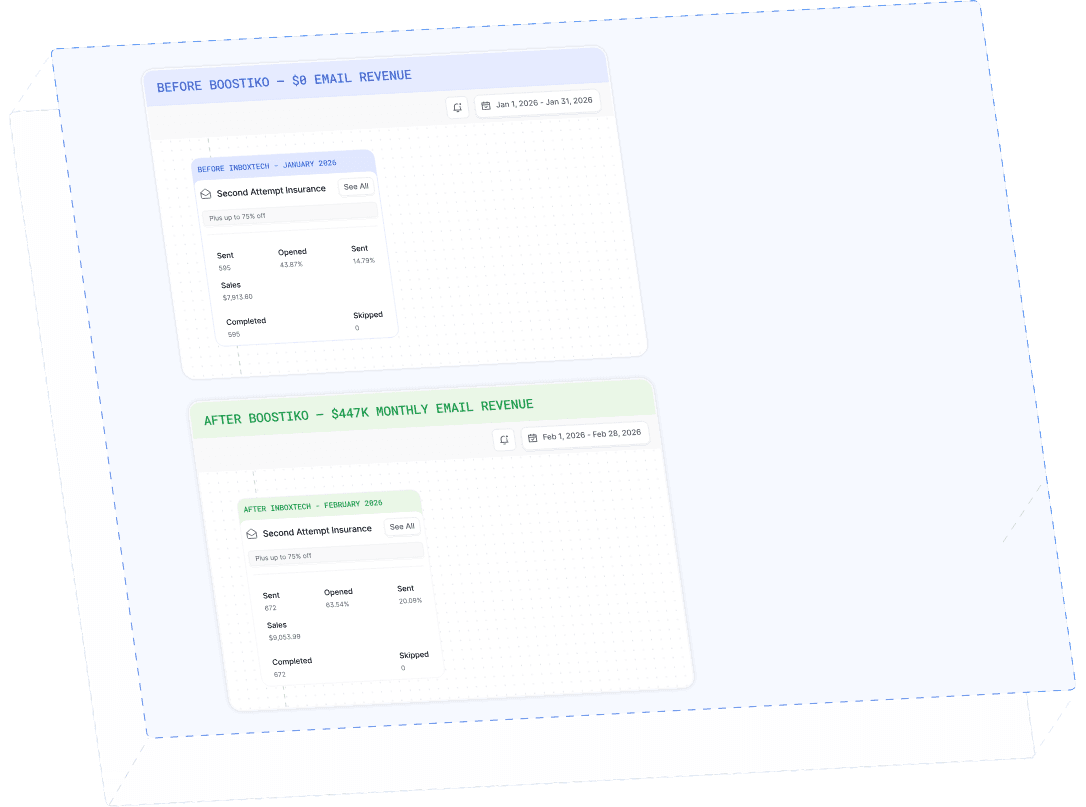
Case Study 01
Leading Prop Firm
$0 - $447K in 3 months
40.7% of total revenue
14 days time to first revenue
$0 to $447,115/month in Added Revenue in 90 Days