•
Boostiko Team
Web3 Prop Firm Wallet Emails: Keep Access Updates Safe
A Web3 prop firm can make a wallet or account update feel simple. Or it can make it look like a scam.
That difference often comes down to the email.
If your program uses wallet connection, account dashboards, community access, or security checks, every email about access has one job: tell the trader what changed, why it matters, and what to do next. Nothing else should compete with that message.
This is not the place to add a flash offer, countdown, or a large sales block. A trader who gets an unexpected wallet or sign-in message is already checking whether it is real. Adding promotion creates more doubt and can blur the purpose of the message.
A strong Web3 prop firm email system separates account notices from marketing. It makes the sender easy to verify. It avoids asking for information that a legitimate team should never need. It gives the recipient a safe route to the official site.
This article is general marketing and operations guidance. It is not legal, financial, trading, or regulatory advice. Have qualified reviewers assess your product, markets, permissions, and final email copy before sending.
Start with the trader's question
A wallet or account email should answer one question quickly:
What changed, what do I need to do, and how can I verify this safely?
That means the message needs a clear label at the top. Examples include:
New device sign-in alert
Wallet connection confirmation
Password or security setting changed
Account verification update
Dashboard access restored
Program rule update
Support request status
The subject line should match the actual event. Do not use a vague line such as “Action required” unless there is a specific action and the body explains it immediately. Do not lead with an offer when the real subject is account access.
CISA lists urgent or emotional language, requests for personal or financial information, untrusted shortened URLs, and incorrect addresses or links as common phishing signs. It advises people to use an independently verified way to contact an organization instead of clicking a suspicious email link. 1
For a Web3 prop firm, that leads to a simple rule: do not make real security emails look like the scams your users are trained to avoid.
Use a fixed format for account and wallet notices
Build one repeatable layout for operational messages. The same structure helps traders recognize legitimate messages over time.
A practical format looks like this:
Event label: “New wallet connected” or “Security setting updated.”
Time and context: The time, account identifier that is safe to display, and relevant device or location information if your system supports it.
Plain explanation: One short paragraph explaining what happened.
Safe next step: A link to the official dashboard or a note that no action is needed.
Security reminder: A fixed sentence that your team will never ask for a recovery phrase, private key, password, or remote device access.
Support route: A direct link to an official help page or support form.
Keep the primary button simple. “Open your dashboard” is clearer than “Secure my wallet now.” If you need a link, use the same primary domain people see in your product and navigation. Avoid shortened URLs, hidden redirects, and a collection of unrelated buttons.
Ethereum.org states that a recovery phrase and private keys should never be shared and that no legitimate service, support agent, or website will ask for them. It also warns that phishing emails can redirect users to imitation sites that request a seed phrase, password reset, or funds. 2
That reminder belongs in every account email that mentions a wallet. It should be clear, permanent, and never hidden in footer text.
Keep promotions out of security messages
A trader who has just received a password reset or new-device alert is trying to decide whether their account is safe. That is not the moment to promote an evaluation discount or a new challenge.
Separating messages also makes internal review easier. Your team should be able to classify every email before it is built:
Operational: Account access, security, verification, system status, support, program rule notice.
Marketing: A promotion, offer, educational campaign, product launch, or reactivation message.
Mixed: An operational message that contains promotion. Avoid this category where possible.
The distinction matters. FTC guidance says an email's primary purpose determines whether it is commercial or transactional or relationship content. It gives account standing and changes to an ongoing relationship as examples of transactional or relationship content, but says that mixing in commercial content can change the classification depending on the subject line and where that content appears. 3
The operational answer is simple: send the account message first. Send any promotion separately to people who are eligible to receive it.
This protects clarity, keeps account notices useful, and prevents a valuable security message from being treated like another campaign.
Build a safe route back to the product
An email should not be the only place a trader can act.
For an important wallet or account event, the email can say: “If you did not make this change, open your browser and sign in at [your official domain].” The user should be able to reach the same destination through the website, not only from the email button.
This approach reduces pressure. It tells the recipient that verification matters more than getting a click.
Use the same domain in these places:
The website navigation
The product dashboard
Account email buttons
Support instructions
The sender's From domain
Your public security page
A dedicated security page is useful. It can list your official domains, explain that your team will not request recovery phrases or private keys, show your support channels, and explain how users can report suspicious messages. Keep the language short enough for a worried user to scan.
Do not require a trader to search Discord, Telegram, or social media for a response to an access issue. Those spaces can be useful for community updates, but account recovery and security should have a stable, official path.
Make the email itself easier to trust
A polished template is not enough. The technical sender setup has to support it.
Google says all senders to personal Gmail accounts need SPF or DKIM. It says bulk senders need SPF, DKIM, and DMARC, and notes that authentication helps protect recipients from spoofing and phishing. 4
For a Web3 prop firm, this should be treated as a baseline, not a final deliverability project. Keep an inventory of every platform that sends from your domain. Confirm which service handles account emails and which one sends marketing campaigns. Review the From address, reply path, and authentication alignment before launching a new flow.
A useful internal checklist is:
Send account and marketing email from domains your team controls.
Authenticate every sending domain and verify that the From domain aligns with your setup.
Use a recognizable From name and reply address.
Keep security templates visually consistent.
Test account email buttons against the real official domain.
Monitor bounces, spam complaints, and replies.
Remove old tools that can still send from your domain.
The goal is not to make every message look technical. The goal is to make impersonation harder and legitimate messages easier to recognize.
Give marketing subscribers a real choice
Web3 prop firms often have several message types: product updates, community news, education, offers, challenge reminders, and account notifications. Treating them as one list creates unnecessary opt-outs and makes consent harder to manage.
Use a preference center that lets people choose the marketing updates they want. Keep account and security notices in their own clearly defined operational stream, subject to the applicable rules and the actual purpose of the message.
ICO guidance says marketing email to individuals generally requires specific consent, subject to a limited existing-customer exception. It also says organizations must not conceal their identity and must provide a valid contact address for opting out or unsubscribing. 5
For commercial email in the United States, FTC guidance requires accurate header information, non-deceptive subject lines, a valid postal address, and a clear way to opt out. 3
These requirements are not an excuse to hide a low-contrast unsubscribe link in the footer. Make subscriber controls easy to use. If someone wants only account messages, let them stop receiving offers without forcing them to leave the product completely.
If you send at bulk volume to Gmail accounts, Google says subscribed and marketing messages must support one-click unsubscribe and include a clearly visible body unsubscribe link. 4
Review every wallet-related campaign before launch
Before an email goes live, ask the team these questions:
Is this an operational email, a marketing email, or both?
Does the subject line describe the real reason for the message?
Would a trader know how to verify the request without clicking the email?
Does the email clearly say that the team will never ask for a recovery phrase or private key?
Does every link go to an official, expected domain?
Is the sender identity consistent with the website and product?
If this is marketing, does the audience have the right permission and a clear unsubscribe route?
Does the message contain accurate product terms, risk information, and the review language required for the relevant market?
The last point matters for any cryptoasset promotion aimed at UK consumers. The FCA says the regime can apply to communications through websites, apps, social media, and online advertising. It says crypto promotions must be fair, clear, and not misleading, and may require risk warnings and consumer-journey friction. 6
Do not assume that a campaign becomes safe because it has a disclaimer at the bottom. Review the entire message, the audience, the offer, the landing page, and the path a user takes after clicking.
A practical lifecycle for Web3 prop firm wallet emails
Here is a simple starting structure.
1. Wallet connection confirmation
Confirm the event, show only safe identifiers, explain that the team will never ask for a recovery phrase, and provide an official dashboard route.
2. New device or sign-in notice
Show the event time and safe context. Give a direct path to account security settings. Do not add an offer.
3. Account verification update
State whether the next action is needed and link to the exact step in the dashboard. Do not make a decision message sound like a sales email.
4. Program or product update
Explain what changed, when it takes effect, who is affected, and where the current terms are published. Send it as a clear notice first. If you later market a related product, send that campaign separately.
5. Marketing education and offers
Send only to the appropriate audience. State the purpose clearly, use reviewed terms, and give the recipient control over future marketing.
6. Suspicious-message support
Create a short flow for people who report a suspicious email. Confirm the report, provide the official security page, and do not request sensitive wallet information by email.
This system is not complicated. It depends on discipline. A trader should never have to guess whether an email is a security notice, a promotion, or an impersonation attempt.
Where Boostiko fits
Boostiko helps Web3 and restricted-niche teams map the messages that go out across account, product, support, and marketing systems. We help define the lifecycle, build the email templates, set up segmentation and preference controls, and keep the content practical for review.
The objective is simple: make important updates clear, make marketing permission-based, and give your team a system that is easier to run.
Book a strategy call to map your Web3 prop firm email operation.
References
Continue reading


Case Study 01
Leading Prop Firm
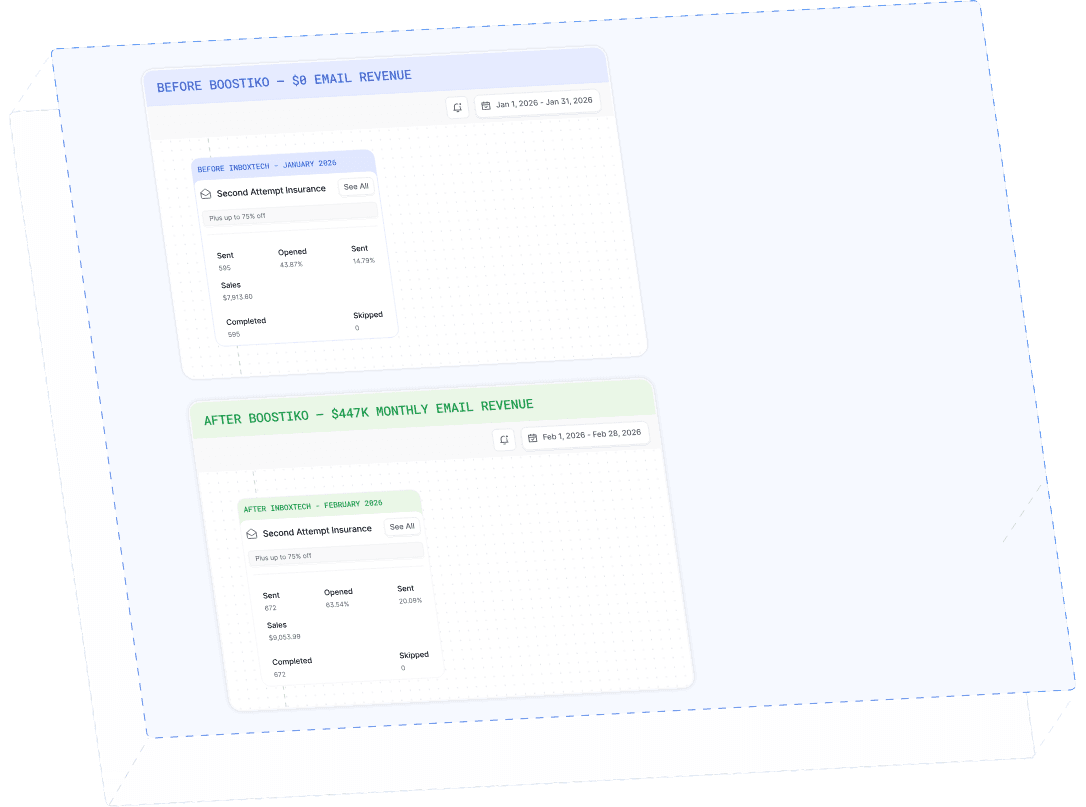
$0 - $447K in 3 months
40.7% of total revenue
14 days time to first revenue
$0 to $447,115/month in Added Revenue in 90 Days